









Illustrative scenario: This is a hypothetical warehouse, not a DataDirect Global customer deployment. Treat its zones as planning prompts and confirm actual controls against site requirements and vendor documentation.

Why separate warehouse traffic?
A warehouse may combine office laptops, handheld barcode scanners, printers, cameras, building systems and guest devices. They do not all need the same access. If every device shares one broad network, a compromised guest endpoint or misconfiguration may create unnecessary paths toward operational systems. Segmentation creates smaller trust zones and makes access rules easier to explain and review.
This example uses three logical groups: corporate and operational devices, guest Wi-Fi, and infrastructure or IoT. The exact number of VLANs, subnets and security zones depends on applications, identity systems, wireless design and existing architecture. VLANs alone are not a security policy: enforcement also requires correctly designed routing, firewall or access-control rules, and management.
An illustrative zone model
| Zone | Example devices | Starting access intent |
|---|---|---|
| Corporate / operations | Staff laptops, managed scanners | Only required business apps, DNS, DHCP, identity and management. |
| Guest | Visitor phones and laptops | Approved internet access; deny internal ranges and device management. |
| Infrastructure / IoT | Printers, cameras, sensors or controllers | Named application or management flows; restrict lateral access. |
Cisco's campus design guide illustrates separate corporate, BYOD, guest and IoT VLANs, and says its configuration should be adapted. Use it as a reference, not as a ready-made warehouse template. Read Cisco's Cloud Campus LAN Design Guide.
Plan scanner and printer connectivity
Handheld scanners move between access points and may depend on reliable access to a warehouse management system, identity services and DNS. Before assigning them to a zone, document required destinations, authentication, address assignment, roaming behavior and support ownership. If older devices cannot use the same authentication as laptops, define a controlled exception and restrict it to necessary services; do not place every device on a trusted network simply to avoid compatibility work.
For printers, record whether jobs originate from a server, workstation or cloud service, and specify who may administer each device. DataDirect's industrial printer overview frames device and procurement questions; verify connectivity for the actual model and print workflow.
Build policy from required flows
Start with an application-flow matrix, not an assumed list of open ports. For each group, identify source, destination, protocol or service, business owner, and direction. Translate approved flows into controls on the gateway or security layer. For example:
- Block guest-to-internal access, including management interfaces; allow only approved internet services.
- Permit scanners to reach named applications and infrastructure services, not broad office endpoint ranges.
- Restrict printer and camera administration to authorized IT systems.
- Log denials during a controlled pilot so missing business flows can be investigated.
Cisco's current small-branch guide documents a platform-specific VLAN, DHCP and firewall example. Use it to structure review questions, not to copy commands into a different environment. Review the Cisco deployment guide.
Validate in a pilot
Test one representative scanner, printer and guest client before migrating a floor. Check address assignment, name resolution, authentication, application access, roaming where relevant, printing, monitoring and support visibility. Test denied paths too: a guest client should not reach private subnets or device administration. A successful internet test alone does not prove internal policy is correct.
Review DHCP capacity, wireless coverage in aisles and loading areas, switch port profiles, uplink capacity, gateway resilience and rollback steps. Segmentation changes can expose undocumented dependencies, so define an appropriate change window, exception approval and rollback trigger.
Questions before buying or changing equipment
- Which scanner, printer, camera and access point models are in scope, and which applications must each reach?
- Who owns authentication, DHCP, DNS, firewall rules and device updates?
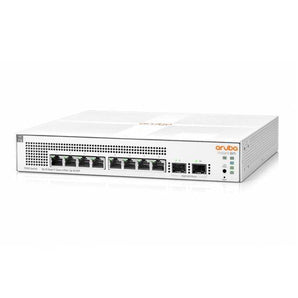
- Can existing switching and wireless enforce the planned separation and provide useful logs?
- What are the pilot group, acceptance checklist and rollback trigger?
These answers help an IT team scope a design or request a bill of materials. See DataDirect's Meraki MR wireless overview, enterprise procurement process, or contact the team. Availability, configuration and service scope are confirmed in a formal quotation.